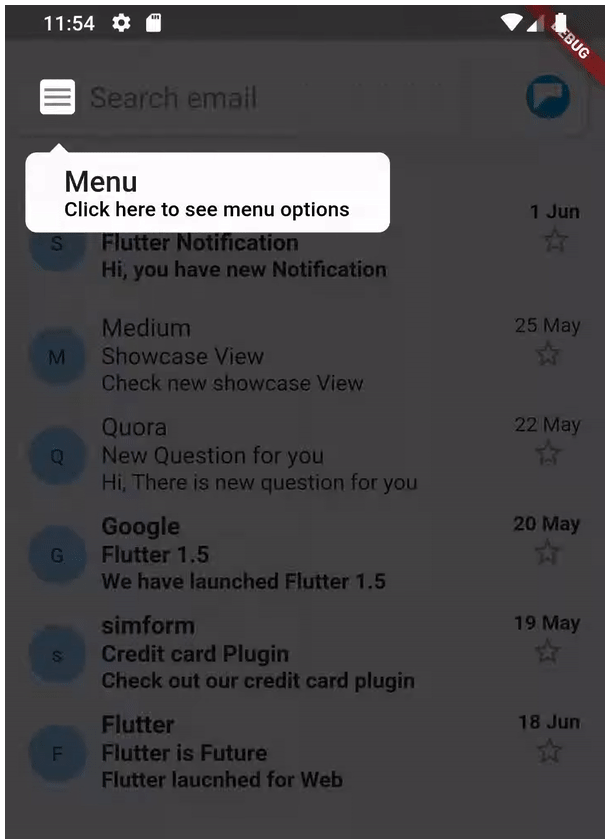
ShowCaseView
A Flutter package allows you to Showcase/Highlight your widgets step by step.
Preview

Installing
- Add dependency to pubspec.yaml
Get the latest version in the ‘Installing’ tab on pub.dev
dependencies:
showcaseview: ^0.1.1
- Import the package
import ‘package:showcaseview/showcaseview.dart’;
- Adding a ShowCaseWidget widget.
ShowCaseWidget(
child: Somewidget(),
),
- Adding a Showcase widget.
GlobalKey _one = GlobalKey();
GlobalKey _two = GlobalKey();
GlobalKey _three = GlobalKey();
…
Showcase(
key: _one,
title: ‘Menu’,
description: ‘Click here to see menu options’,
child: Icon(
Icons.menu,
color: Colors.black45,
),
),
Some more optional parameters
Showcase(
key: _two,
title: ‘Profile’,
description: ‘Click here to go to your Profile’,
shapeBorder: CircleBorder(),
showArrow: false,
slideDuration: Duration(milliseconds: 1500),
tooltipColor: Colors.blueGrey,
child: …,
),
- Using a Showcase.withWidget widget.
Showcase.withWidget(
key: _three,
cHeight: 80,
cWidth: 140,
shapeBorder: CircleBorder(),
container: Column(
crossAxisAlignment: CrossAxisAlignment.start,
children: <Widget>[
…
],
),
child: …,
),
- Starting the ShowCase
someEvent(){
ShowCaseWidget.startShowCase(context, [_one, _two, _three]);
}
If you want to start the ShowCaseView as soon as your UI built up then use below code.
WidgetsBinding.instance.addPostFrameCallback((_) =>
ShowCaseWidget.startShowCase(context, [_one, _two, _three]));
How to use
Check out the example app in the example directory or the ‘Example’ tab on pub.dartlang.org for a more complete example.
Source Credit Url : https://github.com/simformsolutions/flutter_showcaseview


